On the Subject of Button Memory
A match made in heaven. Hell? I think it’s heaven.
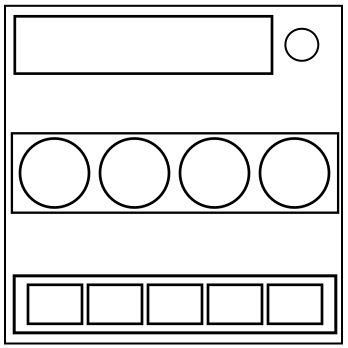
The module has four buttons in a row, a display, and five stage lights. The buttons are red, yellow, white and blue, and are labeled HOLD, PRESS, DETONATE and ABORT, though not necessarily in that order.
Due to budget cuts, only the first letter of the buttons’ labels are shown.
Perform the correct action on the correct button to progress the module to the next stage. Complete all stages to disarm the module.
Pressing an incorrect button or releasing the correct button at the wrong time will result in a strike and reset the module back to stage 1.
Button positions are ordered from left to right.
Stage 1
If the display reads ABORT, hold the button in the fourth position and refer to ‘Releasing a Held Button’.
If the display reads DETONATE, press and immediately release the blue button.
If the display reads HOLD, press and immediately release the button in the first position.
If the display reads PRESS, hold the button in the second position and refer to ‘Releasing a Held Button’.
Stage 2
If the display reads ABORT, press and immediately release the button with the same color as you pressed in stage 1.
If the display reads DETONATE, hold the button with the same label as you pressed in stage 1 and refer to ‘Releasing a Held Button’.
If the display reads HOLD, press and immediately release the button in the same position as you pressed in stage 1.
If the display reads PRESS, hold the blue button and refer to ‘Releasing a Held Button’.
Stage 3
If the display reads ABORT, press and immediately release the button with the same label as you pressed in Stage 2.
If the display reads DETONATE, press and immediately release the button in the same position as you pressed in Stage 1.
If the display reads HOLD, hold the button with the same color as you pressed in Stage 2 and refer to ‘Releasing a Held Button’.
If the display reads PRESS, hold the button with the same label as you pressed in Stage 1 and refer to ‘Releasing a Held Button’.