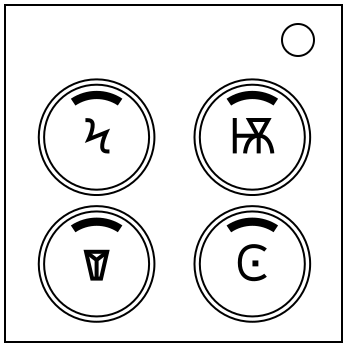
On the Subject of Buttonpads
Pressing four buttons may seem straightforward. That’s the kind of thinking that gets you indoctrinated.
See Appendix A for indicator reference.See Appendix B for battery reference.
See Appendix C for port identification reference.
Follow these rules in the order they are listed. Hold the correct button based on the first condition that applies:
- If there is a blue button with the
 symbol on it, then hold that button.
 - If exactly three of the buttons are the same color, hold the button with the unique color.
- If there is a white button and one of the buttons has a
 symbol on it, hold the bottom-right button.
 - If there is a serial port and an indicator labeled BOB, hold any blue button. If none exist, hold the top-left button.
- If a button has the
 symbol or the
 symbol on it, hold any button that doesn’t have those symbols.
 - If none of the buttons have the
 symbol and there are no yellow buttons, hold any button with a unique color. If none exist, hold the top-right button.
 - If exactly one button has the
 symbol, the
 symbol, or the
 symbol, hold the button horizontally adjacent to it.
 - If exactly one or three buttons have the
 symbol, the
 symbol, the
 symbol, or the
 symbol, hold the button vertically adjacent to the outlier.
 - If none of the symbols in the above rules appeared, hold any button diametrically opposite to a button with a unique color. If none exist, hold the bottom-left button.
- If none of the rules apply, hold the top-left button.
The above only applies to the first button. The correct button to hold after the first one is the same as the LED that most recently turned on.


