On the Subject of Hello, World!

My “Hello, World!” to the universe of KTANE modding, Unity, C# and JavaScript.

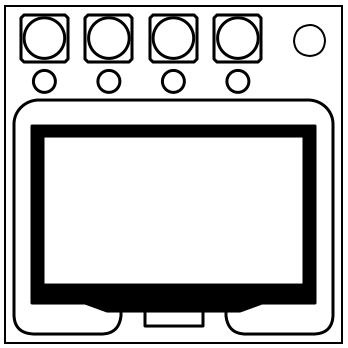
A “Hello, World!” module consists of a screen, and four coloured buttons labelled “He”, “ll”, “o, Wo” and “rld!”, each with a corresponding LED that is initially on.

The screen displays some very carelessly-written C# code by my engineers.

I intended for the buttons to spell out the name of the module. I don’t know how they’ve managed to mess that up as well.

Anyhow, each button press toggles its corresponding LED on and off.

To disarm the module, toggle the LEDs into the correct state. Once any LED has been changed, the module will strike and then disarm if the LEDs are left in an incorrect state for over 5 seconds[1].

To get to the correct state, work through each row in the table. Every time the condition is true, press the button/s specified in that row.

…Hold on.

I’m just getting word that they messed up the toggling as well and made it so that the only way to get an LED to turn off is by holding its button down to blow it up. Those engineers are gonna be engifars by the time I’m done with them.

Well, we all know that exploded LEDs don’t turn back on. You’re just gonna have to make do for now. Sorry.

Condition Button/s
Rule 0 Flips 0
Rule 1 Flips 1
Rule 2 Flips 2
Rule 3 Flips 3
Rule 4 Flips 4
Rule 5 Flips 5
Rule 6 Flips 6
Rule 7 Flips 7
Rule 8 Flips 8
Rule 9 Flips 9

*Only counts if the violating line is not otherwise ignored(see below).

On the Subject of checking the engineers' code

Turns out, all they know how to do is muddy around with two types of variables.

[3]Variables & Types

  • A variable is a “holder” of sorts that has a name and a specified “type”.
  • A variable can hold one value of the specified type.
  • The engineers only know about two types of variables:
    • int type variables, which only hold integer values, and
    • string type variables, which only hold strings of literal text.
    • As far as this module is concerned, a value of type string will never contain any of the digits 0-9.
  • In the table below is a list of everything the engineers know how to do in C#, with examples.
  • Lines of code that look like the following will only ever appear between the innermost curly braces, and this table does not concern code that appears anywhere else.
Code Example Action A line of code has a type mismatch if:
string myString; Declares a string type variable named myString N/A
int myNumber; Declares an int type variable named myNumber N/A
int myString; Declares an int type variable named myString(for whatever reason) N/A
myNumber = 67; Assigns an int value to the int type variable named myNumber The variable to which the program tried to assign the int value was declared a type string.
myString = "Tatterdemalion!"; Assigns a string value to the string type variable named myString The variable to which the program tried to assign the string value was declared a type int.
System.Console.WriteLine(myVar); Reads the variable named myVar N/A
myNumber++; Reads the int type variable named myNumber The variable was declared a type string.
myVar += myOtherVar; Reads the variables myVar and myOtherVar The left variable was declared a type int and the right variable was declared a type string.
  • As far as this module is concerned:
    • A particular variable must be declared before it is assigned a value, and
    • it must be assigned a value before its value can be read.
    • Any lines of code that do not follow this rule should be ignored.
      • For instance, if a line of code immediately tries to assign myNumber = 67; without declaring it first, myNumber should still be considered undeclared(and unassigned).
  • If a line of code has a type mismatch, its action should be ignored.
    • For instance, if myString is declared a type string variable and there is a line underneath that tries to assign myString = 67;, myString should still be considered unassigned.
  • Conversely, if a line of code that contains a type mismatch is otherwise ignored, the type mismatch should still be counted.
    • For instance, if after declaring string myString; the program immediately tries to read myString++;, the type mismatch from the read still counts despite myString not having been assigned to.
  • Note: It is valid for the name of a variable to disagree with with its type or be a misspelled word.
    • For instance, if the program begins by declaring string mySting; the variable mySting is now declared.
    • However, a line that tries to define myString = "Tatterdemalion!"; immediately afterwards would be ignored, as a variable called myString has not yet been declared.

[4]Semicolons

  • Every line of code between the innermost curly braces needs a single semicolon at the end. Nowhere outside the innermost curly braces should there be a semicolon.
  • An “extra semicolon” can take the form of an additional semicolon at the end of a line, or a semicolon otherwise somewhere where it shouldn’t be.
  • A “missing semicolon” is when there isn’t a semicolon at the end of a line where there should be one.
  • If a line of code has missing/extra semicolons but is otherwise valid, its action should still be counted.
    • For instance, if there is a line declaring string myString but it is missing a semicolon, the variable myString should still be considered declared.
  • If a line of code is ignored, any missing/extra semicolons at the end should still be counted.

[5]Keywords

  • Any word on the screen that is neither a value nor the name of a variable is considered a “keyword”[2]. These are special predefined words that the compiler looks for to try to make sense of the code. As such, they cause problems if misspelled.
  • Here is a list of all keywords that may appear on the screen, in alphabetical order.
class Console int Main Program
public string System void WriteLine
  • If a line of code has a misspelled keyword, it should be ignored.
    • For instance, if a line tries to declare sting myString;, the variable myString should still be considered undeclared.
  • Conversely, if a line of code’s action should be ignored, any misspelled keywords in it should still be counted.

[6]Ignored Lines(Summary)

  • If a line is ignored, that simply means that its action does not count and should be disregarded.
  • A line is ignored if it:
    • has a type mismatch
    • has a misspelled keyword
    • tries to assign to a variable before declaring it first, or
    • tries to read a variable before having both declared and assigned to it.
  • If a line is ignored for any reason, any misspelled keywords, type mismatches or semicolon problems it has should still be counted.

Notes

  • Button positions are 1 to 4 from left to right.
  • The code is read top to bottom.
  • [1]This can be adjusted in the modsettings file.
  • [2]Technically, a few of these are a class name, method name or “identifier”, but they’ve been bundled in with the keywords just for the sake of brevity. The same rules apply and this does not need to be worried about.