On the Subject of Hyperage
Can’t really tell... Is this “Hyper-age” or “Hype-rage”?
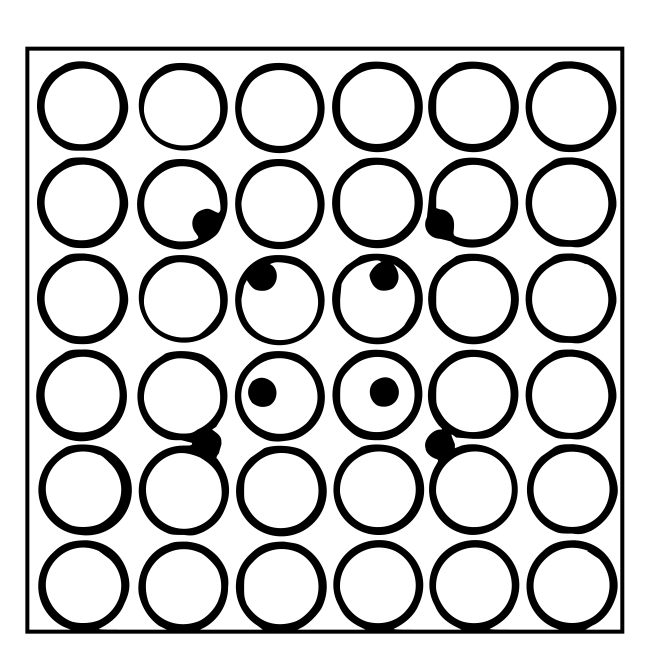
The module consists of 16 buttons and a hypercube.
- To solve the module, determine the hypervolume of the hyperparallelepiped Γ.
- Γ is defined by one of its vertices: O(0, 0, 0, 0).
- Γ is defined by four edges: OA(x1, y1, z1, w1); OB(x2, y2, z2, w2); OC(x3, y3, z3, w3); OD(x4, y4, z4, w4).
Finding the Correct Squares
Hovering over a button will:
- Display a rotation of the hypercube.
- A rotation is denoted by two letters. A rotation AB means that after the rotation, the +A axis is transformed into the +B axis.
- Note: When looking directly at the module:
- +X runs from left to right,
- +Y runs from back to front,
- +Z runs from bottom to top,
- +W runs from inner to outer.
- Display four values, one of which will be unknown and shown as
?.???. - Display a base-16 digit assigned to the button. This is shown for convenience only.
Find four buttons that form a square (called the square buttons) whose center lies exactly on the center of another button (called the center button). Additionally, the rotations of the square buttons, in clockwise order, must be IJ, JK, KL, LI, where I, J, K, and L are distinct hypercube axes (X, Y, Z, W) in any order.
Locate the first square button in reading order and label its coordinates as A. The next square button clockwise is B, then C, then D. For each of A, B, C, and D, replace the missing coordinate with the corresponding coordinate from the center button. Then replace the remaining unknown coordinate with 1.000.
To calculate the hypervolume of Γ, compute the absolute value of the determinant of the matrix whose rows are the coordinates of A, B, C, and D in XYZW order.
Convert the resulting hypervolume to base 4 and truncate it to three digits after the decimal point.