On the Subject of Letting Experts Get On LEGOs
At least this module does not leave any bricks on the floor.
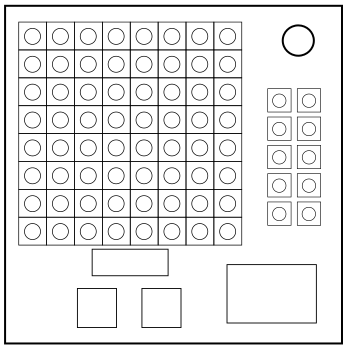
This module contains a lego grid, six colors to the right, a small display below, two arrow buttons and a submit button.
The display shows which page you are on. Use the arrow buttons to change pages:
- PARTS: Pressing the colors lets you look at the shapes of the colored pieces.
- PAGE X: These pages display parts of the structure. On each page, the flashing piece goes on top of the non-flashing piece.
- BUILD: This page allows you to build the structure. Click on the colors on the right, then click on the grid to place bricks. Clicking on the same color on the grid removes that brick.
The structure is modified using the condition table below. Use the first condition that applies on both tables. If the structure has to be flipped, flip it horizontally and reverse the order of the layers.
| Condition | Action |
|---|---|
| If at least three pieces have a 3×2 or 2×3 shape | NO CHANGE |
| Otherwise, if the yellow piece is 1×3 or 3×1 | FLIP |
| Otherwise, if at least 7 instruction pages are present | NO CHANGE |
| Otherwise | FLIP |
| Condition | Action |
|---|---|
| If the green and magenta pieces have the same shape | ROTATE 90 CW |
| Otherwise, if the structure is at least 4 bricks tall | NO CHANGE |
| Otherwise, if the blue piece is above the red piece (before flipping the structure) | ROTATE 90 CCW |
| Otherwise | ROTATE 180 |
The final structure has to be built using the BUILD page. The higher layers overshadow the lower layers. After the structure has been built correctly, pressing the submit button should solve the module.