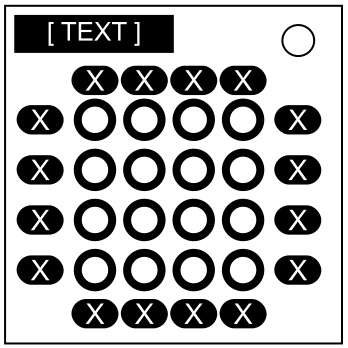
On the Subject of Light Grid

What do the numbers and letters mean, Charlie?!

The module consists of three main parts: a 4×4 grid of circular buttons each lit up in one of five possible colors: white, red, yellow, green, or blue; a set of 16 square alphanumeric labels surrounding the grid of buttons; and a large button (“Enter Key”) above the grid labeled with one of the following: “end”, “done”, “test”, “check”, “enter”, “ready”, “defuse”, “finish”, “submit”, “verify”, “transmit”, or “deactivate.”

Press all buttons that satisfy exactly one rule corresponding to its color.

ColorNo.Rule
White1This button is exactly a Manhattan distance of 3 away from a B, M, Q, S, or X;
7This button is on a column labeled with an even number (unless the Enter Key has a label that is 5 letters or shorter, then replace “even” with “odd”);
13This button’s column contains a letter and the number it represents in a phone number (e.g. one label that says 2 and another that says one of A, B, or C);
19This button’s diagonals contain exactly two digits that share no common divisors;
24This button’s diagonals contain a label that matches either the initial or the number of letters in the name of a Teenage Mutant Ninja Turtle (i.e. 7, 8, 9, D, L, M, or R),
ColorNo.Rule
Yellow3This button is directly next to another blue button, not including diagonals (unless its row or column contains a label whose contents are included in the bomb’s serial number, in which case only diagonals count);
10This button is on the same row or column as one or more of L, N, R, S, or T, but not on the same row or column as one E or more;
15This button orthogonally borders a label containing a letter with the same shape as a Greek letter (A, B, E, H, I, K, M, N, O, P, T, X, Y, or Z);
17This button orthogonally borders both a blue button and a label that says one of the letters on the Enter Key (unless the Enter Key has an even number of characters, in which case replace “yellow” with “green” and “blue” with “red”);
21This button is on the same column as an R and on the same row as one or more of S, D, or G;
Red2This button is a knight’s move away from a K, N, I, G, H, or T;
5This button’s right, bottom, and bottom-right neighbors form the colors of the Windows XP logo (i.e. green, blue, and yellow, respectively);
8This button diagonally neighbors a label with a letter included in the bomb’s serial number;
14This button is on the same row or column as a digit or letter whose ASCII code point is a prime number;
20This button’s diagonals contain exactly one of the digits 8, 6, 7, 5, 3, 0, or 9 (unless the bomb’s serial number contains at least one of those digits, in which case ignore this rule altogether);
ColorNo.Rule
Green4This button is on a row without any other green buttons nor an even number;
9This button is not on the same row or column as a letter that is not one of A, E, I, O, or U (unless the Enter Key has a label containing the letter D, in which case replace “green” with “yellow”);
11This button is on the same row or column as exactly one letter whose Morse Code representation takes an equal number of time units as the letter S;
16This button is on the same row or column as both the letter O and the digit 0, or both the letter I and the digit 1, but not both of these pairs;
22This button is on the same row as an R or an F, and on the same column as a C or a P (unless the Enter Key is labeled with a word with only one type of vowel letter, in which case also apply the rule to white and blue buttons);
Blue6This button’s row and column have at least 3 labels containing a digit;
12This button’s row contains a letter and the number it represents in a phone number (e.g. one label that says 2 and another that says one of A, B, or C);
18This button is at least a Manhattan distance of 4 away from a label with a letter that is not one of A, E, I, O, or U (unless at least 3 labels on the module have letters or digits included in the bomb’s serial number, in which case Y is also excluded);
23This button does not have any other white button on the same row nor on the same column;

Once you’ve pressed all necessary buttons, press the Enter Key to solve the module.

Pressing a button that fulfills less or more than one of these conditions, pressing the same button more than once, or pressing the Enter Key before all the necessary buttons have been pressed will invoke a strike.