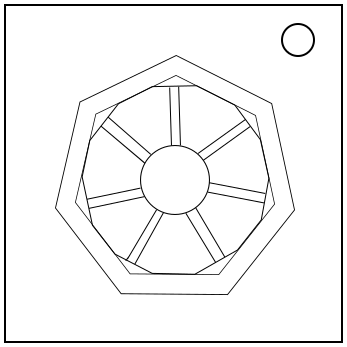
On the Subject of Lightmare

Who’s Grandson is this, and how are they so good at the saxophone?

This module consists of 7 light bulbs and a button in the center which possesses 4 different properties. The light bulbs are constantly flashing four colours from a standard RGB (RGB are primary, CMY are secondary, KW are neither), with a black flash to signify the end of the sequence. Note the module signifies Black with a Gray flash.

The lightbulbs are positioned in a heptagon, with the top being position 1 and the others labeled in clockwise order.

While there are wires connecting all of the bulbs to the button, only 2 will actually be connected at each time, one constant and one changing. To figure out what these bulbs are, convert the serial number from base 36 to base 7, and take the last 6 digits. Any 0s are replaced with 7s. In the case of duplicates, if the last digit of the serial number in base 36 is odd, add 1 to all but the rightmost duplicate, subtracting 7 from any number larger than 7, otherwise do it from the left. Repeat until there are 6 unique numbers. The missing number is the bulb that is always connected to the button.

Now modify the remaining sequence according to the table below.

If...Then
Any bulb’s wire crosses another wire.Swap the first two digits.
The button’s display shares a letter with the serial number.Split the sequence into 3 pairs and reverse each of them.
The button’s pattern is checkerboard and blue.Cycle the sequence to the right equal to the first base-36 digit of the serial number.
The button is a square and is not a secondary colour (CMY).Cycle the sequence to the left equal to the sixth base-36 digit of the serial number.
The serial number or button (but not both) have a letter or number in common with L1GHTM4R3.Switch the first and last digits.
The button’s pattern is cube net and shares a colour with the missing numbered bulb.Reverse the sequence.
None of the above conditions apply.Split the sequence into triplets and cycle the first triplet 1 to the right and the second triplet one to to the left.

The first 4 digits after transformations correspond to what bulbs are connected after every press minus 1, ie first number is connected after 0 presses, second after 1 etc. The two unused bulbs must be assigned a restriction that MUST be followed for every press of the button. This is known as the general restriction.

Use the last colour of the unused bulbs to determine the goal colour. The rule that applies first will be used for each.

If it is a primary colour:

  • If the button’s colour is in this bulbs sequence: Red.
  • Otherwise, if this bulb’s second colour matches bulb 1’s first colour: Yellow.
  • Otherwise, if black is the first colour on this bulb: White.
  • Otherwise, if white is in this bulb’s sequence: Black.
  • Otherwise, if there is an RJ and PS2 port on the same plate: Green.
  • Otherwise, if there is a lit BOB indicator: Magenta.
  • Otherwise, if bulb 7 is one of the unused bulbs: Blue.
  • Otherwise: Cyan.

If it is a secondary colour:

  • If the button’s label shares a letter with a lit indicator: Blue.
  • Otherwise, if the button shares a letter with an unlit indicator: Yellow.
  • Otherwise, if the button’s colour is the third colour in this bulb’s sequence: Cyan.
  • Otherwise, if the buttons pattern is that of a tic-tac-toe, checkerboard, or spiral: Black.
  • Otherwise, if the button is a 4 sided shape: Red.
  • Otherwise, if the button is a star: Magenta.
  • Otherwise, if the button is not a primary colour: White.
  • Otherwise: Green.

If it is black or white:

  • If the button is not a secondary colour: Green.
  • Otherwise, if this bulb flashes the same third colour as the other unused bulb: Red.
  • Otherwise, if there are an even number of batteries and battery holders on the bomb: Black.
  • Otherwise, if there is at least two colours are shared between the two unused bulbs: Blue.
  • Otherwise, if the bulb that is always connected to the button is directly adjacent to this bulb: Cyan.
  • Otherwise, if there are no vowels in the Serial Number: Yellow.
  • Otherwise, if no wires cross: Magenta.
  • Otherwise: White.

XOR the colours together to get a new colour. This is not only the goal colour, but the general restriction. At no point can any button press be made using this colour.

To get the starting colour take all four colours on the bulb that is always connected to the button and XOR the first with the third and the second with the fourth. If there is a letter in the serial number that matches the first letter of one of the colours (black uses B in this case) with this bulb, XNOR the results to get the starting colour, otherwise XOR them. If the starting colour is exactly the same as the goal colour, invert the starting colour.

The temporary restriction is given by the place in the sequence on the always connected bulb minus 1, ie the first flash in the sequence corresponds to the first restricted colour, etc.

To solve the module, make the starting colour equal the goal colour. To do this, push the button when colours are visible on the button that is temporarily connected. Each button press takes the current colour and XORs it with the colour visible on the temporarily connected bulb at that time. If the LED is off between two other flashes, it will take the earlier one. If the LED is off at the end of the sequence, it will do nothing.

If you attempt to press the button to XOR the current colour with either the general or tempoary restriction, the module will strike and reset button presses, though not the entire module. If you don’t get the goal colour after 4 presses, it will do the same. Note getting the goal colour before 4 presses will not strike, but it also will not solve.

Appendix: Binary Colours

To XOR two RGB colours convert both of them into RGB (all colours in this module use standard RGB mixing), representing the colour present as 1 and absent as 0. Then perform the operation on the resulting bits and convert back into a colour. Example: XOR Cyan and Yellow: Cyan is 011 in RGB order, Yellow is 110 in RGB order. XORing gives 101, so the resulting colour is Magenta.

Appendix: Bases

To convert a number from base 36 into base 10, take the values of each character (0-9, then A=10, B=11...), and multiply them by place value times 36. To convert into base 7, divide by 7 and take the remainder, then repeat until you have 0. Reverse the string of characters to get the output.