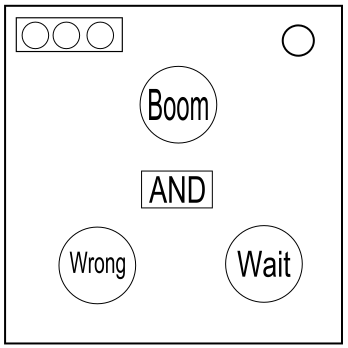
On the Subject of Logical Buttons
Keep thinking logically and nobody explodes.
SEE APPENDIX LOGBTNSX100 FOR LOGIC GATE REFERENCES.
- This module consists of 3 buttons, a stage counter and a screen stating a logic gate. To solve it you will have to go through 3 stages.
- In each stage you will have to determine which of the buttons you will have to press based on their color, label, and the logic gate present.
- If multiple buttons have to be pressed in a stage you will have to determine the order in which you must press them.
- The buttons are numbered in reading order.
- Both the label and the color of a button will hold a true/false value. Once you get both values you run them through the logic gate and get an answer.
- If you get true, the button should be pressed and if you get false it shouldn’t.
- If no button has to be pressed you must press the logic gate screen until you get a logic gate that allows you to press a button.
- When the correct button(s) have been pressed the module will automatically proceed to the next stage.
- If a correct button is pressed the border of the button will light up white.
- B1,B2 and B3 are button 1, 2 and 3 respectively.
Determining values of colors/labels:
The value of the color/label is true if the condition is met.
Colors
- Red - NO Blue button present.
- Blue - 2 or more Blue buttons present.
- Green - The previous button in reading order is Purple or White.
- Yellow - This button’s label is NOT “Wrong” or “Logic”.
- Purple - No buttons in Red, Yellow or Blue.
- White - One or more buttons is in Red, Yellow or Blue.
- Orange - B1 is NOT Orange.
- Cyan - This button's label is "Logic", "Color", "Label" or "Wrong".
- Gray - This button has the same label as another button.