On the Subject of Matchup Charts
"I'm afraid you haven't learned your type matchups!" - Poochyena from Explorers of the Unknown
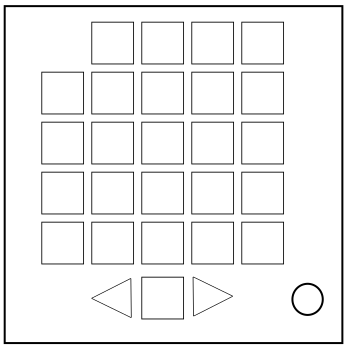
The goal of this module is to assign Pokémon types to the empty displays on the top and left of the module so they properly align with the type charts found later in the manual.
On the module, there will be a 4×4 grid of matchup outcomes. Compare these to the corresponding type chart to find eight types that will result in those exact matchups.
Use the arrow buttons on the bottom of the module to select a type icon to enter in the displays. Then, press an empty display to fill it in with the selected type. Pressing a display that's already filled in will remove the type from that display.
One of the displays will automatically have a type pre-filled in. That display cannot be changed.
When filling in a display with a type:
- If the type matchups properly align with the other types already present in the other displays, the type will be filled in successfully.
- If the type matchups do not align with the other types already present in the other displays, or if the entered type is found in the same row or column of displays, the module will strike and the display will not change.
When all eight displays have been successfully filled in, the module will solve.
To determine which type chart to use:
- If the last digit of the bomb's serial number is 1, use the first table.
- If the last digit of the bomb's serial number is between 2 and 5, use the second table.
- Otherwise, use the third table.


