On the Subject of Mechanical Switches

Tic Tac TAK TAK TAK

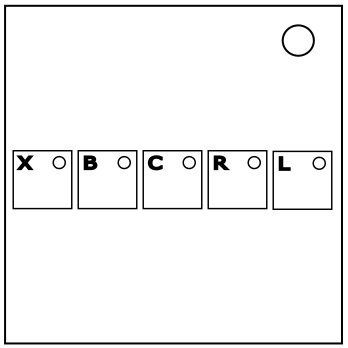
This module contains five computer keyboard keys with different mechanical keyboard switches inside. To solve the module, hold the keys in the correct order.

To start, identify the switches in each of the five keys. See Appendix MSKB for a list of all the switches.

The keys can safely be pressed and released as long as the key is not held for more than one second. Caution: The key's light may turn on after it's released and the module may strike after a period of time. Refer to Rules E to remedy this.

Number the keys 1 to 5 based on the order their switches appear in Table 1 read from top to bottom then left to right. If multiple keys contain the same switch, number those keys by reading order instead.

Table 1:

Cherry
Black Red Brown Blue Clear White Green Grey (Linear) Grey (Tactile)
Gateron
Clear Yellow Green Tealios Zealios
Aliaz
Kailh Box
Black Red Brown White Navy Jade Dark Yellow Burnt Orange Pale Blue
Kailh Pro
Burgundy Purple Green
Kailh
Speed Silver Speed Copper Speed Bronze Speed Gold
Razer
Green Orange Yellow

Using Table 2, find the first applicable rule. Place each of the keys in the first five numbered slots in reading order of Table 3 in the order chosen by the selected rule. These are the keys' starting positions.

NOTE: In this manual, when a rule refers to a switch's color, it must contain that color in its name.

Table 2:

If all the switches are Cherry switches. 1 2 3 4 5
If there are exactly two Red switches. 2 4 5 3 1
If there are exactly three Blue switches. 1 4 5 2 3
If there is only one Speed switch. 5 2 1 4 3
If there are exactly four Brown switches. 4 1 2 3 5
If there are exactly two Razer switches. 2 3 5 4 1
If there is only one White switch. 4 1 5 2 3
If there are exactly three Kailh Box switches. 1 5 2 3 4
If there are exactly three Green switches. 2 5 3 4 1
If there are more than two Razer switches. 3 4 1 5 2
If more than half of the switches are Gateron or Kailh Pro. 2 3 1 4 5
If there is exactly one Gateron switch. 4 3 5 1 2
If all the switches are Kailh Box switches. 3 1 2 4 5
If there are exactly four Gateron switches. 2 4 1 3 5
If there are both at least one Tealios and one Zealios switch. 1 5 4 3 2
If all the switches have different categories. 4 2 3 1 5
Otherwise. 5 4 3 2 1

Each numbered space on Table 3 refers to a rule in Rules C.

To find the keys' ending positions, perform the following steps in Rules A:

Rules A: Moving the keys

  • Take all of the characters of the bomb's serial number and convert any letters to numbers based on their position in the alphabet.
  • Take the digital root of all the converted serial number digits.

Rules A (cont.)

  • For each digit, move the specified key down-left on Table 3 if it less than 5. Otherwise, move the specified key down-right.
  • Start with the key numbered '1'. Move this key once on Table 3 in the direction specified by the first converted serial number digit.
  • Then move the key numbered '2' twice on Table 3 using the directions specified by the second and then third converted digits.
  • Continue for each of the remaining keys in numerical order. Move them a number of times equal to their number using the directions specified by the next consecutive serial number digits.
  • When you exceed six digits, return to the first digit and continue from there.

Repeat the steps in Rules A two more times for a total of three iterations. Once done, the keys are now at their ending positions.

If you cannot move the key on Table 3 in the desired direction for any reason, follow the rules in Rules B. Find the first rule that applies, then rotate the key based on the applicable rule. Then, attempt to move the key on Table 3 again in the desired direction relative to its rotation. If you are still unable to perform the desired movement, follow Rules B again (unless rule 1 applies).

Rules B: Cannot move keys

  1. If the key cannot move in any diagonal direction, or if this is the fifth time following Rules B for this movement, the key does not move. Ignore the rule of the space the key is on.
  2. If the key cannot move downwards in either horizontal direction and the rule of the space the key is currently on is true, rotate the key 90° clockwise.
  3. If the key cannot move downwards in either horizontal direction, rotate the key 180°.
  4. If the key cannot move in the desired direction because the key would move off Table 3, rotate the key 90° counter-clockwise if the desired direction is down-left, or rotate it 90° clockwise otherwise.
  5. If the key cannot move in the desired direction because the space in that direction is occupied by another key, rotate the key 90° counter-clockwise.

After any successful movement, if the rule of the space the key moved to is true, rotate the key 90° counter-clockwise.

Table 3:

32 9 40 2 11
8 12 4 41
15 39 25 30 35
20 18 22 17
19 31 26 37 24
36 7 5 33
16 38 27 21 1
3 13 28 10
29 6 14 34 23

Rules C: The List of Rules

  1. The bomb has at least two lit indicators.
  2. The bomb's serial number contains a vowel.
  3. This key has a Kailh Pro switch.
  4. The bomb has an even number of modules.
  5. The bomb was initiated on a Sunday.
  6. The bomb's serial number contains at least three distinct digits.
  7. This key has a Cherry switch.
  8. This key has a Red switch.
  9. The bomb has at least two modules with "Simon" in its name.
  10. The bomb has exactly one indicator.
  11. The bomb has an even number of batteries.
  12. The bomb has an odd amount of DVI-D ports.
  13. The bomb has an empty port plate.
  14. This key has a Blue switch.
  15. There are no ports present on the bomb.
  16. There are no port plates present on the bomb.
  17. This key has a Kailh Box switch.
  18. This key has a Clear switch.
  19. The bomb does not have a module with "Simon" in its name.
  20. The bomb has exactly one Mechanical Switches module.
  21. The bomb has an odd number of batteries.
  22. The bomb has at least one module with "Piano Keys" in its name.
  23. The bomb has at least one Turn The Key or Forget Me Not module.
  24. The bomb has exactly three port plates.
  25. This key has a Gateron switch.
  26. This key's number is 3 or 4.
  27. This key's number is 2.
  28. This key's number is 3.
  29. This key's number is 2 or 5.
  30. The bomb has an odd number of indicators.
  31. The bomb has an odd amount of parallel ports.
  32. This key has either a Purple or Yellow switch.
  33. The bomb's serial number contains an even digit.
  34. The bomb has exactly two batteries.
  35. This key has a Razer switch.
  36. The bomb's serial number contains a "0".
  37. This key has either a Brown or Black switch.
  38. The bomb has exactly one battery.
  39. The bomb has exactly five ports.
  40. The bomb has exactly three indicators.
  41. The bomb has exactly one Souvenir module.

Once the keys in are their ending positions, order each of the keys by their positions on Table 3 in reading order.

Hold each of the keys on the module in the determined order and follow Rules D. Unless specified, each key must be held for at least five seconds. As a key is being held, its light will turn on. Take note of its color when following the rules.

Rules D: Holding the keys

  • If the key's light does not match the color of its switch, and the switch's color is Red, Orange, Yellow, or Green, release the key when the last digit of the bomb's timer is the difference between two values.
    The first value is the column number of Table 1 where the key's switch is located, with the leftmost column being 1. The second value is determined by the key's light, using this list below:

Red = 1, Orange = 2, Yellow = 3, Green = 4, Blue = 5, Purple = 6, White = 10

  • If the key's light starts flickering rapidly, release the key within two seconds after the flickering starts.
  • If the key's light is not flashing a color, and the key's switch is not a Clear switch, release the key when the last digit of the bomb's timer is equal to the column number of Table 1 where the key's switch is located, with the leftmost column being 1.
  • Otherwise, release the key anytime.

Once all five keys have been held and released successfully in the proper order, the module will solve.

If the wrong key is held, or the correct key was released at the wrong time, the module will strike once the key is released. The module will then reset and the switches will change.

If the key's light turns on after it's released:

The key is faulty. Review Rules E before interacting with the key again. Once the key is successfully held or tapped again, the key will fix itself and its light will return to normal. Unless specified, the key must be fixed within one minute after its light turns on, or you will receive a strike.

Rules E: Faulty keys

  • If the key's light is constantly lit and its color matches the color of the key's switch, you cannot interact with the key until one minute after the light turned on.
  • If the key's light is constantly lit but its color does not match the color of the key's switch, you can only interact with the key when the last digit of the bomb's timer is equal to the following value† based on the light's color:

Blue/White = 0, Red/Green = 2, Orange = 4, Purple = 6, Yellow = 7, Grey = 9

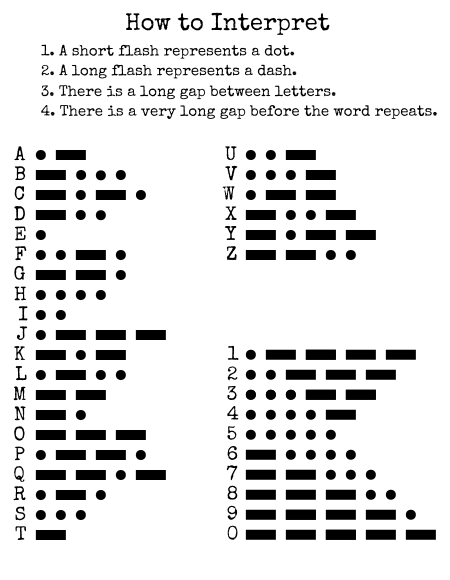
  • If the light is transmitting a Morse Code letter, and the transmitted letter is present on a lit indicator on the bomb, you must tap the key three times within two seconds before it can be held. The key's light will turn off when done successfully.
  • If the light is transmitting a Morse Code letter, but the transmitted letter is not present on a lit indicator on the bomb, convert the letter to a number based on its position in the alphabet, then take the digit root of that number.
    • If the calculated number is not equal to the last digit of the bomb's serial number, you can only interact with the key when the last digit of the bomb's timer equals this number†.
    • If the calculated number is equal to the last digit of the bomb's serial number, you can only interact with the key when the second-to-last digit of the bomb's timer equals this number modulo 6†.

† This does not affect release times.

Appendix MSKB

Cherry Black Cherry Red Cherry Brown Cherry Blue Cherry Clear
Linear
60cN Force
2mm Actuation
4mm Travel Distance
Linear
45cN Force
2mm Actuation
4mm Travel Distance
Tactile
45cN Force
2mm Actuation
4mm Travel Distance
Clicky
50cN Force
2.2mm Actuation
4mm Travel Distance
Tactile
65cN Force
2mm Actuation
4mm Travel Distance
Cherry White Cherry Green Cherry Grey (Linear) Cherry Grey (Tactile) Gateron Clear
Clicky
85cN Force
2mm Actuation
4mm Travel Distance
Tactile
80cN Force
2.2mm Actuation
4mm Travel Distance
Linear
80cN Force
2mm Actuation
4mm Travel Distance
Tactile
80cN Force
2mm Actuation
4mm Travel Distance
Linear
35cN Force
2mm Actuation
4mm Travel Distance
Gateron Yellow Gateron Green Gateron Tealios Gateron Zealios Gateron Aliaz
Linear
50cN Force
2mm Actuation
4mm Travel Distance
Clicky
80cN Force
2mm Actuation
4mm Travel Distance
Linear
67cN Force
NA
NA
Tactile
62-78cN Force
NA
NA
Silent Tactile
60-100cN Force
2mm Actuation
4mm Travel Distance
Kailh Box Black Kailh Box Red Kailh Box Brown Kailh Box White Kailh Box Navy
Linear
60cN Force
1.8mm Actuation
3.6mm Travel Distance
Linear
45cN Force
1.8mm Actuation
3.6mm Travel Distance
Tactile
60cN Force
1.8mm Actuation
3.6mm Travel Distance
Clicky
55cN Force
1.8mm Actuation
3.6mm Travel Distance
Clicky
75cN Force
1.7mm Actuation
3.6mm Travel Distance
Kailh Box Jade Kailh Box Dark Yellow Kailh Box Burnt Orange Kailh Box Pale Blue Kailh Pro Burgundy
Clicky
65cN Force
1.7mm Actuation
3.6mm Travel Distance
Linear
70cN Force
1.8mm Actuation
3.6mm Travel Distance
Tactile
70cN Force
1.8mm Actuation
3.6mm Travel Distance
Clicky
70cN Force
1.8mm Actuation
3.6mm Travel Distance
Linear
50cN Force
1.7mm Actuation
3.6mm Travel Distance
Kailh Pro Purple Kailh Pro Green Kailh Speed Silver Kailh Speed Copper Kailh Speed Bronze
Tactile
50cN Force
1.7mm Actuation
3.6mm Travel Distance
Clicky
50cN Force
1.7mm Actuation
3.6mm Travel Distance
Linear
50cN Force
1.1mm Actuation
3.5mm Travel Distance
Tactile
50cN Force
1.1mm Actuation
3.5mm Travel Distance
Clicky
50cN Force
1.1mm Actuation
3.5mm Travel Distance
Kailh Speed Gold Razer Green Razer Orange Razer Yellow
Clicky
50cN Force
1.4mm Actuation
3.5mm Travel Distance
Clicky
50cN Force
1.9mm Actuation
4mm Travel Distance
Silent Linear
45cN Force
1.9mm Actuation
4mm Travel Distance
Linear
45cN Force
1.2mm Actuation
3.5mm Travel Distance

Appendix M3CH - List of Mechanical Switch Terms:

  • Keycap - The cover of the key that a user can press on to type with it.
  • Color - The switch's color is determined by the color of its stem. The stem is found underneath each keycap.
  • Travel Distance - The maximum distance a key can move downwards while being pressed. For the purposes of this module, the distance between the module's surface and the bottom of unpressed keycaps is 4mm.
  • Actuation - The distance at which a key registers that it's being pressed.
  • Force - The amount of force it takes to move a key to its actuation point. For the purposes of this module, this is illustrated with interaction punches when the keys reach their travel distance.
  • Category - Switches are categorized based on their travel mechanism, feel, and sound. The three categories are Linear, Tactile, and Clicky.
  • Linear - When a key is pressed, it will move vertically at the same rate at all distances.
  • Tactile - When a key is pressed, it will move slowly when above its actuation point, and faster when below its actuation point.
  • Clicky - Similar to Tactile, although the switch makes a distinct clicking noise when fully pressed and released.
  • Silent - The switches' sounds are quieter than normal. A silent switch is considered a different category for the purposes of this module.