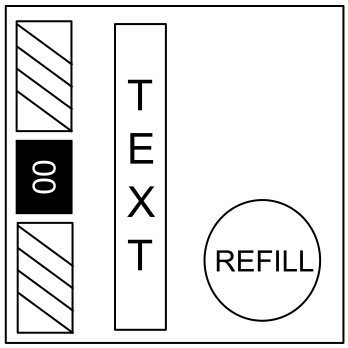
On the Subject of Needy Augmentation

Houston, we still have a problem. A less annoying problem, but a problem.

  • This utility needy balances or otherwise changes activation behavior of other needy modules.
  • This module can only affect modules on the same bomb.
  • Behavior and difficulty changes are mission-specific.*

* Module’s configuration has to be placed in the mission’s description.
Refer to “On the Subject of Setting Up Needy Augmentation”.

When Configured

  • The display will read “AUGMENTED” if augmentations are in effect.
  • The display will read “UNCHANGED” otherwise.
  • Needy Augmentation itself will never activate.
  • Only 1 Needy Augmentation can behave like this on each bomb. Every other instance of Needy Augmentation will behave like it is not configured.

If the configuration has an error, it will be logged and a strike sound will play.
No actual strike is recorded and no augmentations are made, however the module will still not activate.

When Not Configured

  • The display will read “NO CONFIG”.
  • When this module activates, the display will show a draining bar.
  • Press the “Refill” button before the bar is fully drained.

On the Subject of Setting Up Needy Augmentation

They can finally stop beeping. For five minutes.

  • To augment needy modules you need:
    • A single instance of Needy Augmentation on the bomb.
    • A configuration in the mission description.
  • Each needy module can be augmented independently.
  • This module is only a tool. It is still up to you, as the mission creator, to make missions fun. You do not have to use it either if you don’t want to.

† One Needy Augmentation module can augment multiple needy modules, but they have to be on the same bomb.
You may need to use multiple Needy Augmentation modules in the same mission in cases of multiple bombs.

‡ Dynamic Mission Generator places the whole mission source as the description.
Use a /* */ comment to configure Needy Augmentation without format violations if you are using DMG.

Configuration

  • A configuration has the following format:
    [NeedyAugmentation]module:property=expression,property=expression,...;
  • Alternatively, bigger configurations can be written on multiple lines:
    [NeedyAugmentation]
    module:property=expression,...;
    module:property=expression,...;
    module:property=expression,...;
    [/NeedyAugmentation]
  • Properties are separated by commas, modules are separated by semicolons.
  • Consider using <hidden> for players with the Description Hider mod.

Module ID

  • module is the ID of the module to augment.
  • You may specify the same ID multiple times to augment multiple copies of the same needy differently. The augmentations will be picked in order.
  • Augmentations for modules that could not be found are skipped.
  • * is a wildcard and will affect all otherwise unspecified needy modules.
  • Without the wildcard, unspecified modules retain their original behavior.
  • When augmenting Black and White, only augment blackModule.

Properties And Expressions

  • The table below lists all possible properties. Every property is optional.
  • Seconds are based on the countdown timer.
  • Whitespace is not significant.
PropertyExpressionsDescription
acttime seconds
seconds s

(Initial) Activation Time

Default: use mission’s setting.

  • Overrides the initial activation time.
  • The needy still reacts to solves and strikes.
  • seconds is a float (decimal number).
cd *mult
+addend
-subtrahend
*mult+addend
*mult-subtrahend

Reactivation Cooldown

Default: no change.

  • Multiplies the time between needy activations by mult (if present), then adds addend or subtracts subtrahend seconds.
  • mult, addend and subtrahend are all floats.
acts base
base+perSolve
base-perSolve
base+per/solves
base-per/solves

Activations / Activation Limit

Default: unlimited number of activations.

  • Limits the number of times the module can activate to base times.
  • per and solves add or remove per activations every solves solved regular modules.
  • perSolve is equivalent to per/1.
  • base, perSolve, per and solves are integers.
start seconds s
modules m

Start At

Default: start when the bomb starts.

  • Prevents the module from activating until either modules regular modules are solved or seconds seconds have passed.
  • The module behaves as if the bomb was just started afterwards.
  • seconds is a float (decimal number).
  • modules is an integer.

Properties And Expressions (cont.)

PropertyExpressionsDescription
term secondsLeft sl
modulesLeft ml

Terminate At

Default: do not terminate until the bomb is defused.

  • Permanently disables the module when either modulesLeft unsolved regular modules remain or secondsLeft seconds remain.
  • The module is deactivated, if it is active.
  • secondsLeft is ignored in Zen and Time modes.
  • secondsLeft is a float (decimal number).
  • modulesLeft is an integer.
stop secondsLeft sl
modulesLeft ml

Stop At

Default: do not stop until the bomb is defused.

  • Equivalent to “Terminate At”, except the module is not automatically deactivated, if it is currently armed.

Examples

  • module:cd=+60;
    Adds an extra minute to the module’s reactivation cooldown.
  • module:cd=*0+60;
    Forces a module’s cooldown to always be 60 seconds.
  • module:term=1ml;
    Completely disables a given module, when only one unsolved module is left. Can be used to disable needy modules during the input phase of a boss module.
  • module:acttime=0,cd=*0+0.25,acts=0+1;
    Makes a module activate after a regular module is solved, demanding attention like a boss module would.
  • module1:stop=180sl;
    module2:start=120s,acttime=0s;
    If the bomb starts with 5 minutes (300 seconds) on the countdown timer, then at 3 minutes (180 seconds) remaining, the first needy module will stop activating and the second needy module will take its place.