On the Subject of Numbers Stations

Reminder to burn the one-time pad key after you’re done!

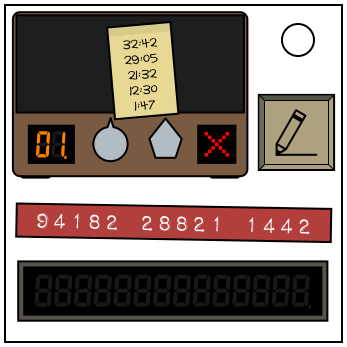
A “Numbers Station” module has a mounted shortwave radio with a seven-segment display, a volume meter, and two dials. The left dial controls the radio’s channel, and the right dial controls the volume, which is set to zero by default.

Additionally, a sticky note with multiple timestamps has been left on the radio. To the right of the radio is the “Write” button. Below the radio is a 14 digit sequence and submission display.

Tune in to the correct radio station at the right time and note down its readings. Decrypt the message using the one-time pad and submit it to solve the module.

Step 1: Tuning

The radio can tune into 36 different channels. The current channel number is shown on the segmented display. Only when tuned in to one of these channels do the segments turn from orange to green. Stay tuned into the channel that turns the segmented display green.

Between every set of 14 digits for all stations, a short ditty of a recognizable children’s song will be heard. This song dictates the actual channel you must tune the radio to for your code.
Find the song’s name in the table below. If the number of batteries on the bomb is odd, tune the radio to the channel number on the left of the children’s song. Otherwise, tune the radio to the channel number on the right of the children’s song.

These three songs are similar, but distinct. The Alphabet Song’s “L, M, N, O, P” and Baa Baa Black Sheep’s “Have You Any Wool?” are sung rapidly at different sections of the melody. Note that Twinkle, Twinkle does not have this property. This distinguishes each song from each other.

In addition, two songs are similar, but distinct. The long notes of It’s Raining, It’s Pouring are split between words in Ring Around The Rosie. This distinguishes both songs from each other.

36Hickory Dickory Dock04
02Old MacDonald10
34The Muffin Man31
29The Alphabet Song*12
23Wheels on the Bus33
19Bingo07
16Itsy Bitsy Spider13
09Pop! Goes The Weasel14
27Three Blind Mice30
01Twinkle, Twinkle*18
11London Bridge08
06I’m A Little Teapot15
22It’s Raining, It’s Pouring*32
28Hot Cross Buns26
17Ring Around The Rosie*20
25This Old Man35
24Baa Baa Black Sheep*03
21Row, Row, Row Your Boat05

Step 2: Timing

A maximum of five scheduled times are written on the sticky note. However, every time has been offset by the same amount. This is, however, unless a Voltage Meter reads less than 3 volts or an AC port is present on the bomb. If this is true, all written times are correct and you may skip to the last paragraph of this section.
Otherwise, calculate the offset in seconds using the rules below:

  • Count the number of times the short ditty is repeated between every read of 14 digits. This number ranges from 1 to 5. Multiply this by 10.
  • Add the sum of the rightmost digit for all written times.
  • If the ditty played is on the left side of the table above, divide the number in half, rounding down. Otherwise, leave it as is.

Add this calculated offset in seconds to every timestamp that is written on the sticky note. Wait for the bomb’s timer to count down to any one of the modified timestamps, turn up the volume, and note down the given set of 14 digits.
Only at these times will the correct digits be given. All other digit sets are extraneous.

Step 3: Decrypting

Take the 14 digits you’ve just received and pair the first digit with the second digit, the third with the fourth, and so on until all digits have been paired with another. Use the same pairing system with the 14 digit sequence below the radio.
You should obtain 14 two-digit numbers, 7 from each sequence. Subtract each number from the received sequence with the corresponding number from the written sequence as seen in the example below:

This example assumed the received digits are 15443 30824 4956, and the written sequence below the radio is 94182 28821 1442.

Received : 115 44 33 108 24 49 56
Written : -94 -18 -22 -88 -21 -14 -42
Final Code : 21 26 11 20 03 35 14

As seen above, if the received number is smaller than the written number, add 100 to the received number. All 7 numbers in the code obtained from this operation must fall within the range of 01 to 36.

Step 4: Submitting

To submit your final code of 7 numbers, set the radio’s channel to the first number and press the Write button. The channel’s number should appear on the bottom display. For example, if the first number of the final code is 21, tune the radio to Channel 21 and press the Write button. This will add 2 and 1 onto the display. Do the same for each of the other 6 numbers. If all 7 numbers have been decrypted and submitted successfully, the module will solve.