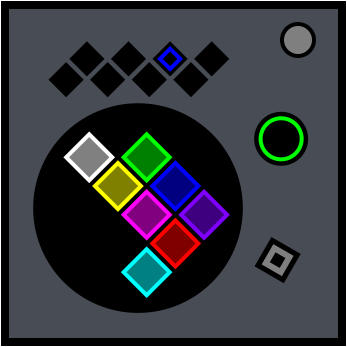
On the Subject of Octomino
Don’t let the path make you forget where the end is.
An octomino is a shape made of eight equal square cells connected edge-to-edge. Depending on the stage, the shape will be a 2D, 3D, or 4D octomino.
Each cell has a unique color:
|
Red
|
Green
|
Blue
|
Cyan
|
|
Magenta
|
Yellow
|
White
|
Purple
|
The buttons along the top of the module correspond to the cells’ colors. Once a stage begins, each button will be assigned a unique color.
Controls
- Control buttons: The eight buttons along the top of the module. Use them to move across the octomino’s cells.
- Reset button: Hold it for two seconds to reset the module. The reset function is only available while the timer is not running. This returns the module to Stage 1, resets the timer, and generates a new octomino puzzle. The button also displays the current stage progress (green inner sector) and information about the current stage’s offset (outer ring).
- Rotation button: Located at the bottom-right. Use it to rotate the octomino.
Final/Start Buttons & Offsets
Before a stage begins, one of the eight control buttons is lit. This is the final button. The start button is determined by the offset. The color of the offset indicator on the reset button (outer ring) identifies which value to use for the offset:
| COLOR |
Red
|
Green
|
Blue
|
Cyan
|
Magenta
|
| VALUE | Strikes | Solved modules | Ports | Indicators | Batteries |
| COLOR |
Yellow
|
White
|
Purple
|
| VALUE | Stage number | Last Serial Number digit | Total modules |
If multiple offset colors are displayed, calculate the offset for each color separately and add the values together.