On the S

This one is not quite a Rubik’s Snake.

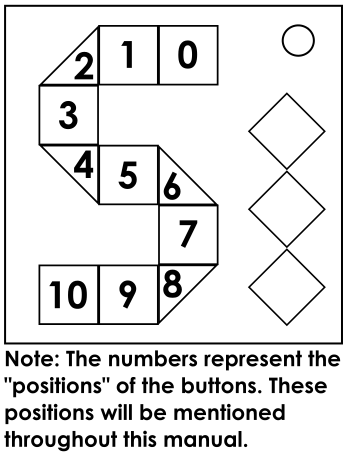
This module has 11 colored buttons arranged into an S shape, and 3 LEDs on the right representing 3 stages. All buttons have distinct colors, but one of the 12 colors will be missing from the module. The displayed colors change every stage. The module will only check submission once you have done all required presses. Striking will go back to the first stage, but all answers stay the same.

If colorblind mode is enabled, the word corresponding to the color you’re currently hovering over will appear between positions 0 and 6 on the module.

Note: It is recommended to set the highlighter color to for the best highlighting experience.

Stage 1: Scramble Substitutions

A false sense of simplicity.

Stage 1 has 5 flashes and 5 presses. For each flash, find the appropriate row and column in the table below. The resulting color is the one to press.

FlashRedOrangeYellowLimeGreenJade CyanAzureBlueVioletMagentaRose
1stCyanAzureBlueVioletMagentaRose RedOrangeYellowLimeGreenJade
2ndAzureBlueCyanGreenJadeLime MagentaOrangeRedRoseVioletYellow
3rdBlueCyanMagentaGreenYellowRed OrangeVioletJadeRoseAzureLime
4thJadeMagentaLimeBlueOrangeCyan RoseGreenVioletYellowAzureRed
5thRedBlueCyanJadeLimeRose AzureGreenOrangeVioletYellowMagenta

If the color to press is missing, press the color that flashed instead. Note down the colors of the flashes, the colors and positions of the presses and the missing color for Stages 2 and 3.

Stage 2: Bamboozling Modifications

You always end up modifying more than you think.

Stage 2 has 6 flashes and 8 presses. To obtain R, take all of the positions of the flashes in Stage 2, then append the positions of the presses in Stage 1. Convert the result from base-11 to base-10 and take the last 2 digits. If the module "Bamboozled Again" is present, swap the digits. This will be your R-value.

To obtain S, start with R, then modify using each flashing color in stage 2. If at any point...

  • S exits the range 00-99, add/subtract 100 until in range again.
  • S becomes a single digit, prepend a zero.

D1 refers to the first digit of S, and D2 refers to the second digit. DR refers to the digital root of S, and abs(D1 - D2) refers to the absolute difference between digits.

ColorOnly flashed in Stage 1Only pressed in Stage 1Both Flashed and PressedNeither Flashed nor Pressed
RedSubtract S from 100Add 10 * D1Subtract D1Do nothing
OrangeReplace D1 with 9 - D2Replace D1 with abs(D1 - D2)Replace D2 with D1Add DR
YellowAdd 50Add 9 - D1Add D2Double S
LimeAdd D1 + DRAdd D2 + DRSubtract the higher digitAdd D1 * D2
GreenAdd D1 + D2 - 18Add the higher digitSubtract D1 + D2Add D1 + D2
JadeAdd 2*(D1 + D2)Add 2 * D1Subtract 2 * D1Add 2 * DR
CyanSubtract S from 99Add 10 * D2Subtract D2Swap the digits
AzureReplace D2 with 9 - D1Replace D2 with abs(D1 - D2)Replace D1 with D2Subtract DR
BlueSubtract S from 50Add 9 - D2Add D1Double S and add 1
VioletSubtract D1 + DRSubtract D2 + DRSubtract the lower digitSubtract D1 * D2
MagentaAdd abs(D1 - D2) - 9Add the lower digitSubtract abs(D1 - D2)Add 18 - D1 - D2
RoseSubtract 2*(D1 + D2)Add 2 * D2Subtract 2 * D2Subtract 2 * DR

In addition to the flashes, S will also be modified using edgework and the presence of other modules. Look through the table below, and if the condition applies, apply the color modification using the table above. If you encounter a semicolon, apply the colors before the semicolon, then if the extra statement is true, apply the color after the semicolon.

Skip this table if you can spell "SIMON" with your indicators.

ConditionColor Modifications
SND or SIG indicator is presentRed
MSA or NSA indicator is presentCyan
“Simon’s Sums” or “OmegaForget” is presentThe missing color in Stage 1
Serial port or PS/2 port is presentOrange; Violet if Stereo RCA port is present
Other distinct one-character modules are presentJade; Rose if module “7” or “h” is present
A module with the word “Simon” is presentAzure
Serial number contains the letter SRose; Jade if multiple S letters appear in the serial number
At most one distinct module out of “Cruel Boolean Wires” and “Modulo Maze” is presentThe missing color in Stage 2
Serial number contains 6 or 7Blue, Cyan; Lime if both are present
At most one of the following applies:
  • A port plate with only a DVI-D port is present
  • There are only D-batteries present on the bomb
  • SND or IND indicator is present
Magenta, Green; Yellow if “D” is present
47 or more modules on this bombThe color in position 5; Lime if there are 71 or more modules on the bomb
No strikes upon entering Stage 2 for the first timeYellow

This will be your final S-value. Note down R and S as well as the missing color for stage 3.

Use both digits in S to determine what to press (1st digit, then 2nd digit). A number in square brackets refers to that position. If you’re attempting to press the missing color, press the complementary* color instead.

01234 56789
Red [10] Jade [0]Cyan Blue [4] [2][8] Magenta [3] GreenViolet [6] [10] Cyan[9] [4] Orange Yellow Lime [1] Azure [7]Yellow [2] [5] Jade[1] Rose Lime [0][6] Red Blue [8]Green [7] Orange [5]

*The complementary color refers the the color with color value of (current color value + 6) modulo 12.

Stage 3: Deviation and Decay

Statistically, you will find this as the most improved section.

Stage 3 has 7 flashes and a unique press sequence. To start off, Obtain 5 values:

  • The sum of the positions and color values of the 1st and 2nd flashes.
  • The sum of the positions and color values of the 3rd and 4th flashes.
  • The sum of the positions and color values of the 5th and 6th flashes.
  • The position plus the color value of the 7th flash, plus R.
  • The sum of the color values of the missing colors from all 3 stages, plus S.

Note: A "color value" refers to the number of colors you need to go clockwise from Red (0) to get to the color (e.g. Jade has a color value of 5).

ColorRedOrangeYellowLimeGreenJade CyanAzureBlueVioletMagentaRose
Value012345 67891011

Take the standard deviation of the 5 values:

  1. Take the sum of the values, then divide by 5 to get the mean.
  2. Take the absolute differences between the values and the mean to get 5 new values.
  3. Square each new value and add them together.
  4. Divide by 4.
  5. Take the square root to get your standard deviation.

Remove the decimal point, then take the first 4 digits of the standard deviation to obtain A. Multiply A by the square root of (111.1 + S), and round down to obtain B.

Create two sequences T and U using the following steps:

  1. The first two elements of T are equal to A and B.
  2. The nth element of U is equal to the quotient of nth element of T divided by n+1th element of T.
  3. The n+2th element of T is equal to the remainder of nth element of T divided by n+1th element of T.
  4. The final element of T is always equal to 0.
  5. U will always be two elements shorter than T.

Create the submission sequence as follows:

  1. Join the elements of U into a string separated by commas.
  2. If the module "Decay" is present, reverse the string. Numbers with more than one digit must also be reversed (e.g. 24→42, 100→001).
  3. Add two commas to the end of the string.

The sequence will be inputted into the module using positions (colors do not matter). All commas are to be interpreted as positions 10. Pressing position 10 twice in a row will submit your answer. Submitting the correct answer will solve the module.

String Construction Example

For convenience, let’s say that A is 3516, S is 05, and that this module is paired with a Decay. B is equal to 3516 * sqrt(111.1 + 5) = ~37884.

T3516378843516272479234896603624120
U01013231112

Pre-reversal:
0,10,1,3,2,3,1,1,1,2

Submission Sequence:
2,1,1,1,3,2,3,1,01,0,,