On the Subject of Scalar Dials
*Twist* Wait, did I hear something? *Twist*
You are required to know module's mechanics, basic octave structure (C,C#,...,A#,B), what an interval is and the meaning of "#"" and "b" symbols in order to use this manual.
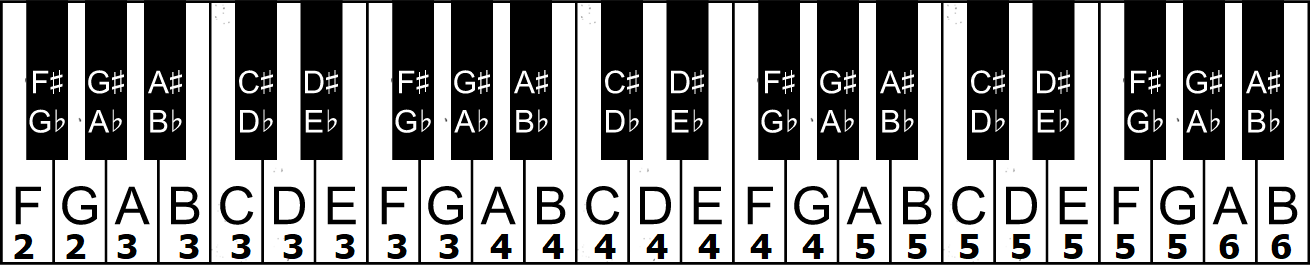
Virtual piano that you need to use: here
WARNING! virtual piano has different octave numbers for A,A#,B. Refer to the keyboard on the last page for the actual note names.
Step 1: Initial Positions
For each dial, do the following:
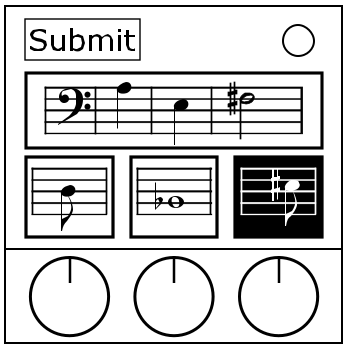
- A: Set the dial to its lowest note.
- B: Click the small screen to hear the note and find its name using the virtual piano.
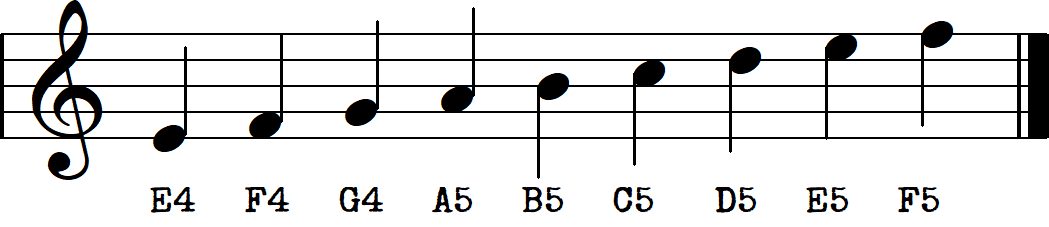
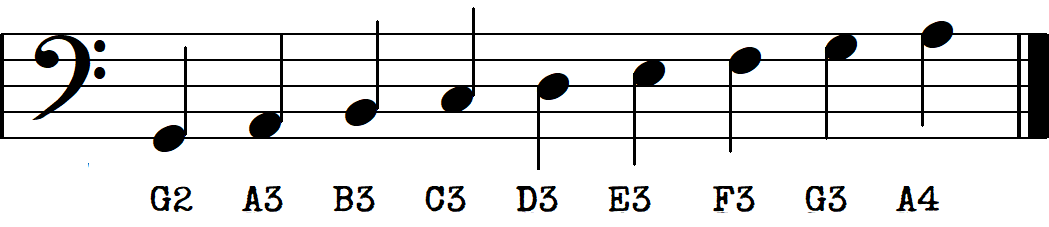
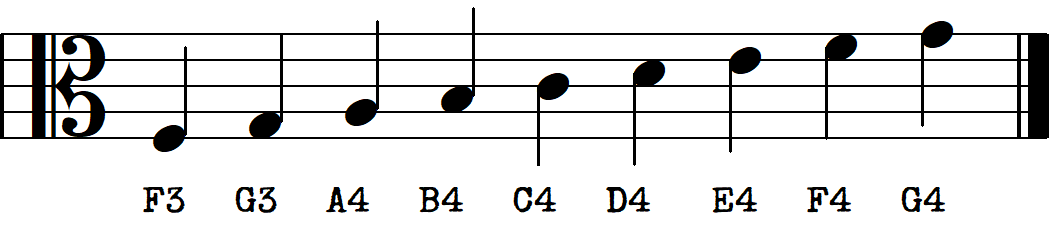
- C: Observe the big symbol on the left of the large screen (clef). Find the note from the large screen on that clef's diagram, get its name (dont forget to apply sharp or flat if present).
- D: Use large screen's note for column, dial's note for row. Get 3 numbers. Set the dials' positions to those numbers.
| C/B# | C#/Db | D | D#/Eb | E/Fb | F/E# | F#/Gb | G | G#/Ab | A | A#/Bb | B/Cb | |
|---|---|---|---|---|---|---|---|---|---|---|---|---|
| C | 8 | 1 | 3 | 1 | 6 | 9 | 5 | 7 | 4 | 0 | 2 | 0 |
| Db | 1 | 2 | 4 | 3 | 6 | 2 | 9 | 5 | 1 | 7 | 0 | 8 |
| D | 3 | 7 | 4 | 2 | 3 | 1 | 8 | 5 | 2 | 6 | 9 | 0 |
| Eb | 1 | 9 | 5 | 4 | 3 | 0 | 7 | 2 | 8 | 4 | 3 | 6 |
| E | 6 | 4 | 8 | 5 | 4 | 2 | 3 | 1 | 0 | 5 | 7 | 9 |
| F | 2 | 4 | 5 | 1 | 6 | 5 | 0 | 6 | 8 | 9 | 7 | 3 |
| F# | 6 | 5 | 2 | 0 | 7 | 1 | 3 | 8 | 6 | 4 | 7 | 9 |
| G | 2 | 4 | 8 | 9 | 5 | 3 | 7 | 1 | 8 | 7 | 0 | 6 |
| Ab | 3 | 0 | 5 | 2 | 1 | 9 | 8 | 8 | 6 | 9 | 4 | 7 |
| A | 7 | 5 | 3 | 0 | 9 | 6 | 8 | 9 | 4 | 2 | 0 | 1 |
| Bb | 4 | 1 | 0 | 8 | 6 | 2 | 1 | 7 | 5 | 0 | 3 | 9 |
| B | 0 | 1 | 1 | 6 | 2 | 2 | 8 | 9 | 7 | 5 | 3 | 4 |