On the Subject of Simon s'Morse

“Just think about it Simon. In just a few hours, you and I will be sitting around a campfire making delicious hot schmoes.”
“They’re called s’mores, Tasha.”

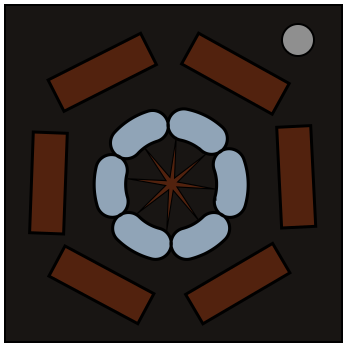
This module has 6 colored logs arranged in a circle around a campfire.
Each log will be a unique color.
The possible colors are; Red, Green, Blue, Cyan, Yellow, Magenta, Orange, pInk, blacK, White.
One of the logs will be flashing a character in Morse Code.

For 4 stages, use the color and the position of flashing log and the morse code character.
Enter the correct morse code character on the correct log, then press the campfire to submit.
If a mistake is made, hold the campfire for 2 seconds to reset the current stage to the initial state.

Simon wants to toast a marshmallow perfectly for a s’more, and needs to hold his marshmallow at specific angles from specific locations to do so.
He is giving feedback about the marshmallow’s toasting status through the color and position of the flashing log, as well as the transmitted character.

Determining Simon’s target seat

Simon needs to sit on the correct log to get the best position to toast the marshmallow.
To see what position to sit next, look at the table below.
Use the color of the currently flashing log and its position around the circle to get Simon's goal postion.
If this is stage 1, Simon’s initial position is the currently flashing log.
Otherwise, Simon’s current position is the goal position from the previous stage.
R G B C Y M O I K W
TLTL-1+2OPPBL+1MRTRBRNULL
ML+1BRBLMRMLBR-1TLOPPML
BLBL+2-2TL-2TR+2MR+1TR
TR-2TRMRBLNULLOPPML-1NULL+2
MRNULL+1TR+2BRML+1OPP-1MR
BROPPTL-1MLBL-2NULL-2TLBR

Key:

XX: Go directly to that log
+#: Move # times clockwise form the current log
-#: Move # times counter clockwise form the current log
OPP: Go to the opposite side of the circle from the current log
NULL: Don't move from the current log

Determining Simon’s target angle

Simon also needs to angle his marshmallow in a specific way to toast it to perfection.
Each character in the table below corresponds to an angle.
To determine Simon’s goal angle, take the first character in the serial number and find it in the table. This is the location of the campfire and will never change locations.
Next, find the transmitted character in the table and determine its offset from the campfire.
Apply the same offset to Simon’s current angle to get his goal angle. The grid wraps around.
If this is stage 1, Simon’s initial angle is the cell with the second character of the serial number.
Otherwise, Simon’s current angle is the goal angle from the previous stage.

Ø12345
6789AB
CDEFGH
IJKLMN
OPQRST
UVWXYZ

Submitting Simon’s position and angle

To set Simon’s goal position and angle, use the log at the goal position to transmit the character corresponding to the goal angle in morse.
This will cause the fire to turn white and the pressed log to transmit the inputted character back. Use this to confirm that the module interpreted the correct character.
To submit, tap the campfire once an angle and position is set.
Only set the log for the current stage.
If a mistake was made, hold the campfire for 2 seconds to reset the current stage to the initial state.

If the set position and angle are correct, the module will progress to the next stage.
If either the set position or angle are wrong, the module will strike and reset the current stage to the initial state.
Successfully complete 4 stages to solve the module.

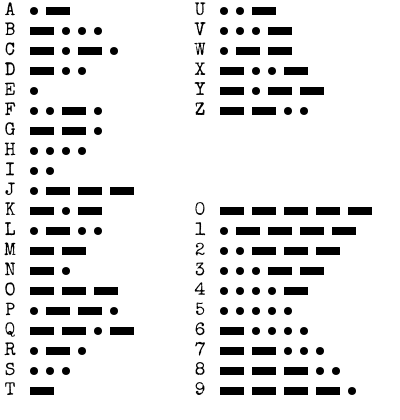
Appendix MORSE:

Dots and dashes, dits and dahs.

How to Interpret

1. A short flash represents a dot.

2. A long flash represents a dash.

3. There is a long gap between letters.

4. There is a very long gap before the word repeats.