On the Subject of Slightly Switching Up Simon’s Sums

At this point, I don’t know why Simon isn’t used to the timer by now...

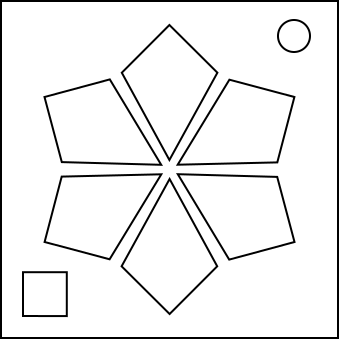
This module has six kite-shaped buttons with the colors Red, Yellow, Green, Cyan, Blue, and Magenta. There will be two flashes in the first stage, three in the second, and four in the third. The stage counter will be shown in the bottom left corner.

To pass a stage, press correct buttons at the right time.

NOTE: You can angle the bomb to make flashes easier to recognize.

Gathering values

I-values

Every button is associated with an I-value. Take the first character of the serial number, convert from base-36 to decimal, add the obtained value from the table using color as row and button location as column to get your I-value of that color. If this I-value is higher than 35, subtract 36.

NNESESSWNW
Red000620243231
Yellow032935261227
Green181723092519
Cyan070214111028
Blue010521160413
Magenta303415083322

F-values

Every flash is associated with an F-value.

  1. Start with the I-value of the flashed button.
  2. Add the number of times this color flashed in the current stage, minus one.
  3. If an adjacent button’s color flashed in this stage, add eight.
  4. If this is the second or third stage and this color didn’t flash in the previous stage, subtract fifteen.
  5. If this is NOT the first flash of the stage, subtract one for every step counterclockwise to get from current flashed button to the previous flashed button, BUT if the previous flash is the same color as this one, add thirty instead.
  6. If this F-value is negative, remove the negative sign (make it positive).
  7. If this F-value matches a previous F-value earlier in this stage, increment the current F-value until it doesn’t.

Note down the F-values of all flashes. You will need them for the very end.

Determining Button Presses

Obtain button presses using the table below. Only use F-values of the current stage.

Press 1Press 2Press 3Press 4
Stage 1Button with the lowest F-valueButton with the highest F-value--
Stage 2Two clockwise from lowest F-valueDiametrically opposite second-highest F-valueComplementary* color of the highest F-value-
Stage 3 Start from the lowest F-value, then go clockwise until you reach Red, Green or Blue Start from the second-lowest F-value, then go counterclockwise until you reach Cyan, Magenta or Yellow Complementary* color of the button diametrically opposite second-highest F-value See “The Final Press”

*Complementary colors are Red ↔ Cyan, Green ↔ Magenta, Blue ↔ Yellow.

When To Press

Y-values

Each button press is associated with a Y-value. It determines the time to press.

  1. Take the sum of the F-values of the button’s flashes for that stage. If this button didn’t flash in this stage, use the button’s I-value instead.
  2. Divide by the number obtained from the table using the button’s location as column, and the color as row. Round down after division.
NNESESSWNW
Red1.3961.9901.9001.2011.0391.688
Yellow1.7141.1011.1801.8541.3671.675
Green1.5301.5621.9691.4971.1591.672
Cyan1.4881.0481.7591.7941.3561.555
Blue1.8831.8871.9611.3421.4091.138
Magenta1.4921.0991.1621.6981.8601.482
  1. Add the Y-value of the previous press. If this is the first press of this stage, use the last press of the previous stage, or zero if it’s first stage first press.
  2. Modulo by 5. That’ll be the Y-value of this press.

Note down the Y-values of each press. You will need them for the very end.

Pressing The Button

Press the obtained button when the sum of the last two bomb timer’s digits, modulo five, is equal to your Y-value.

Once you’ve done the first press, the buttons will NOT flash until you do all the presses needed for this stage. Refer to “Module Submission” for more information.

The Final Press

This section is used for determining the fourth press of the third stage.

The initial target button is the button with the highest F-value of this stage.

  1. Start with the target button’s color’s I-value and add all F-values associated with the target button’s flashes this stage.
  2. Add twice the sum of the previous Y-values in all stages (there should be eight of these).
  3. Multiply by (2+0.2*(strike count at the time of the previous press)).
  4. Exponentiate to the value obtained by the table under the “Y-values” using the target button. and round down. This will be your final X-value.
  5. Follow the table below to modify the target button:
ConditionAction
The buttons (starting with north and going clockwise) are Red, Green, Blue, Cyan, Magenta, Yellow. Skip this table and use the button that flashed for your target button. Go straight to step 7.
The northwest button is Yellow.Go to the diametrically opposite button.
Red is diametrically opposite Cyan.Go to the button with the complementary color (Red ↔ Cyan, Green ↔ Magenta, Blue ↔ Yellow).
Yellow and Green are separated by one button.Go counterclockwise until you reach Red, Green, or Blue.
Blue and Magenta are separated by one button.Go clockwise until you reach Cyan, Magenta, or Yellow.
Red is in the top half of the module.Go to the next color in the sequence RYGCBM.
Blue is in the bottom half of the module.Go to the next color in the sequence RGBCMY.
Starting from Red, the Blue button is further clockwise than Green.Go two clockwise.
Starting from Cyan, the Yellow button is further clockwise than Magenta.Go counterclockwise once.
  1. Go clockwise as many times as your X-value to get your final target button. However, if the first table condition applied, skip this action.
  2. Take the digital root of your X-value.
  3. Add the Y-value obtained in the previous press.
  4. If the target button is north, southeast, or southwest, add one. If it’s northeast, south, or northwest, subtract one. This will be your Y-value of the final press.
  5. Press the final target button when the sum of the last two bomb timer’s digits is exactly your Y-value.

Once you do the final press and the presses before it correctly, the module should solve.

Extra Information

Module Submission

If anything went wrong with your presses (wrong time or wrong button), then the module hands out a strike and will stay at the same stage. The flashes will stay the same and so will the presses (with the exception of the final press).

If the last submission resulted in a strike, the stage counter will start flashing different letters to mark the results.

  • The Stage Number - The break in-between presses.
  • G/M - The correct button was pressed at the right time.
  • Y/B - The correct button was pressed at the wrong time.
  • R/C - The wrong button was pressed.

Colorblind Mode

If the colorblind mode is enabled, hovering over a button will show a letter on the stage counter.

The shown letter refers to the first letter of the color of the button currently being hovered over (Red, Yellow, Green, Cyan, Blue, Magenta).