On the Subject of The Eclipse
Every end of a time is another begun...
This module simulates the orbits of two celestial bodies (A and B) about a common origin. To solve the module, predict the eclipse of the bodies and set the module’s time and viewfinder angle to when and where this will occur.
The orbits of the bodies are elliptical and centered about the origin. For convenience, the velocity for body A will be equivalent to a random integer between 6 and 14 inclusive, divided by 8. The velocity of body B will be equivalent to the square root of a random integer between 5 and 8 inclusive. The velocity is defined as 2π/Period, where the Period is the amount of time for a body to complete a revolution.
Reading Module Data
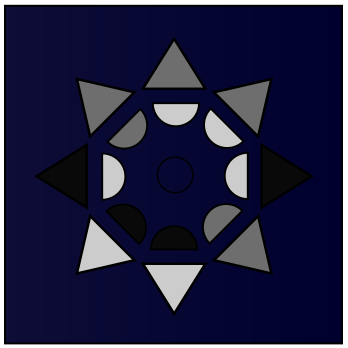
All numerical data on this module is converted into ternary, where black represents 0, grey represents 1, and white represents 2. Values are read through the colours of the buttons, North clockwise from most to least significant. The outer layer of buttons represents the integer part of the value, the inner layer represents the fractional value. For example, the svg in the top right reads 11012201.22210021, translating to about 3070.97638. The module initially shows a random number.
Units of angles are encoded in bendians instead of degrees or radians. To convert from bendians to radians, multiply by (2π/6561). To convert back, multiply by (6561/(2π)).
The module can display different types of information.
- A: Celestial body A.
- B: Celestial body B.
- V: The module’s viewfinder.
- P: The power of any changes to other values, where the base is 3.
- T: The time.
- Nδ: The distance between the celestial body N and the origin.
- Nθ: The angle celestial body N appears in the sky above the horizon (XY-plane).
- Nφ: The angle celestial body N appears in the sky counter-clockwise (towards +Y) from the XZ-plane.