On the Subject of The Heptabutton

It could have been the Octabutton, but that’s called a Super Thin Octagonal Prism.

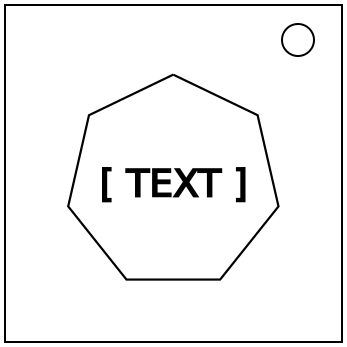
This module has a heptagonal button with a label. To solve the module, the button must be held and released (which may include being tapped) seven times in total. Each vertex of the heptabutton has a light. After each stage is passed, one LED will light up. Keep track of the button’s color each stage.

If the button is tapped at an incorrect time, the module will strike. If the button is held or released at an incorrect time, the module will strike when the button is released. Striking will not reset the module.

Any conditions that refer to holding the button for a specific length of time consider the bomb’s timer. Tapping the button means holding it over zero timer ticks.

Stage 1:

Take the number of letters on the button, and add the first digit of the serial number. Tap the button when the last digit of the timer is this number.

Stage 2:

Add the RGB values of the previous button’s color and the current button’s color separately, and subtract 3 if any numbers are greater than three. Multiply the first digit of the result by three, and add the second digit. Hold the button when the last digit of the timer is this number, and release when the last digit of the timer, modulo 3, is equal to the third digit.

Stage 3:

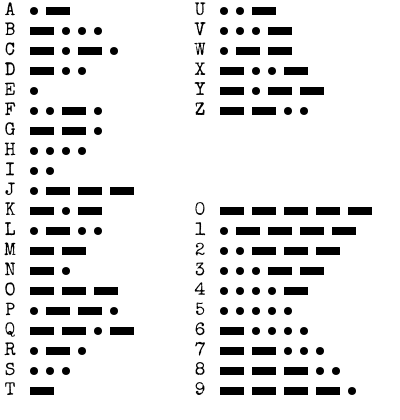
Take the first letter of the serial number, and convert it into Morse code. Start with a number initially equal to 0. For each dot, add 1, and for each dash, add 3. The button may be held anytime, but it must be held for a number of seconds equal to the number obtained, and it must be released when the last digit of the timer is equal to the last digit of the serial number. The button may change colors while being held; if so, remember this!

Stage 4:

If, on the last stage, the button changed colors while being held, tap the button when the total number of seconds remaining contains the digit 0. Otherwise, hold the button when the last digit of the timer is equal to the number of batteries, modulo 10, and release after holding for at least 6 seconds, but no more than 8 seconds.
If you struck on the last stage, only consider if the button changed colors while you successfully held it.

Stage 5:

Convert each letter of the button’s label into Tap Code. Add each row number and each column number, and consider these as two numbers. Consider two other numbers, X and Y. The sum of the row numbers will determine X, and the sum of the column numbers will determine Y. For each of these sums, follow these rules below:

  • If the number is divisible by 7, the variable is equal to 7.
  • Otherwise, if the number is a multiple of 11, the variable is equal to the sum of the digits in the serial number, modulo 10.
  • Otherwise, if the number does not contain a digit in the serial number, the variable is equal to the positive difference between the first and last digits of the serial number.
  • Otherwise, if the number is greater than the other number, the variable is equal to the first digit of the sum of both numbers.
  • Otherwise, the variable is equal to 0.

If the button’s label has an odd number of letters, hold the button when the last digit of the timer is X, and release when the last digit of the timer is Y. Otherwise, hold when the last digit is Y, and release when the last digit is X.

Stage 6:

If the button is the same color as it was at any previous stage, tap the button when the last digit of the timer is equal to the earliest of those stages’ numbers. Otherwise, if the button’s label has 7 letters, tap the button when the last digit of the timer is 7. Otherwise, add the alphabetic positions of every letter on the button (A=1, B=2, etc.), and take the last digit. Tap the button when the last digit of the timer is this number.

Stage 7:

Add every RGB value of the button colors in every stage together, including this stage. Additionally, add the sum of the serial number digits, modulo 18. If the total number of modules on the bomb does not contain the digit 7, subtract this number from 60. If the resulting number has one digit, prepend a 0. Hold the button when the seconds digits of the timer display this number, and release the button 7 seconds later.

After stage 7 is completed, the module will be solved! References for Morse Code, Tap Code, and the colors used on this module are below.

Morse Code

Morse Code Table

Tap Code

Tap Code is shown on the table below. Row numbers are on the left, and column numbers are on the right. K is substituted with C.

12345
1ABCDE
2FGHIJ
3LMNOP
4QRSTU
5VWXYZ

All Colors

There are 27 possible colors on this module, each with RGB values from 0 to 2.

ColorRGB
Black000
Indigo001
Blue002
Forest010
Teal011
Azure012
Green020
Jade021
Cyan022
Maroon100
Plum101
Violet102
Olive110
Gray111
ColorRGB
Maya112
Lime120
Mint121
Aqua122
Red200
Rose201
Magenta202
Orange210
Salmon211
Pink212
Yellow220
Cream221
White222