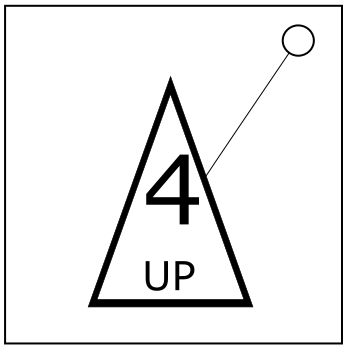
On the Subject of The Triangle Button
I agree, counting is hard...
Grid A
| Red (X/0) | Green (0/X) | Purple Tap |
| Brown (0/X) | Orange Tap | Blue (X/0) |
| Grey Tap | Pink (X/0) | White (0/X) |
List B
| Abort | 7 |
| Bam | 4 |
| Black | 4 |
| Blam | 8 |
| Blank | 3 |
| Blue | 3 |
| Bom | 4 |
| Bomb | 9 |
| Boom | 5 |
| Brown | 8 |
| Button | 2 |
| Caption | 5 |
| Circle | 3 |
| Clear | 7 |
| Cyan | 4 |
| Defuse | 9 |
| Detonate | 4 |
| Digit | 8 |
| Digital | 4 |
| Display | 6 |
| Down | 4 |
| Downward | 7 |
| Duck | 9 |
| Eight | 9 |
| Enter | 6 |
| Execute | 8 |
| Expert | 2 |
| Five | 5 |
| Four | 3 |
| Green | 7 |
| Grey | 4 |
| Hexagon | 4 |
| Hold | 8 |
| Kaboom | 3 |
| Label | 7 |
| Left | 6 |
| Leftward | 9 |
| Lefty | 8 |
| Mauve | 7 |
| Minus | 8 |
| Modulo | 1 |
| Nine | 2 |
| No | 6 |
| One | 7 |
| Orange | 8 |
| Pink | 9 |
| Plus | 7 |
| Pointing | 9 |
| Press | 2 |
| Punch | 5 |
| Purple | 5 |
| Quack | 8 |
| Red | 2 |
| Regular | 3 |
| Release | 8 |
| Right | 3 |
| Righty | 5 |
| Run | 1 |
| Seven | 8 |
| Six | 9 |
| Slap | 7 |
| Square | 6 |
| Submit | 4 |
| Tap | 3 |
| Ten | 1 |
| Text | 4 |
| Three | 8 |
| Triangle | 7 |
| Two | 8 |
| Up | 8 |
| Upward | 2 |
| Walk | 5 |
| White | 6 |
| Yes | 8 |
| Zero | 1 |