On the Subject of Wind-Up Maze
All this turning and shuffling is making me dizzy @~@
⚠️ IMPORTANT ⚠️
This is a module in the Wind-Up series.
Refer to Appendix WIND-UP KEY for important notes.
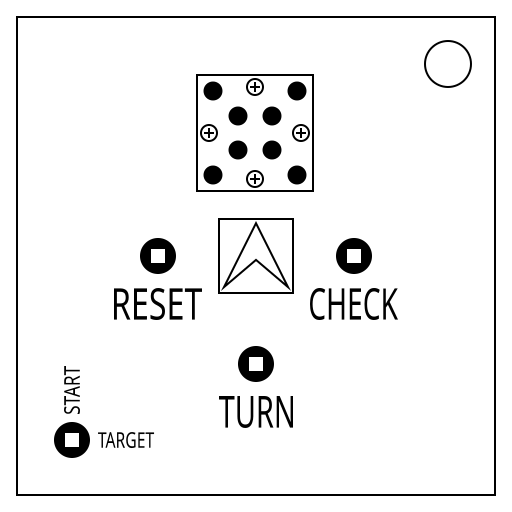
This module holds a RESET, SUBMIT, and TURN key hole, as well as a button. To solve, find your starting coords, target coords, and which maze to use.
The starting and target coordinates can be found using the keyhole in the bottom left and the LED grid on the top panel. Up shows the start lights, right shows the target lights.
The white light is the base coordinate. Each red light is a condition to check.
For each red space, move the base in the direction of the adjacent arrow, by the number returned from the red space.
Calculate START/TARGET separately. Loop across edges.
| RIGHT | D Batts | → | ↓ | AA Batts | DOWN |
| → | Nums in SN | Lets in SN | ↓ | ||
| ↓ | 3rd in SN | 6th in SN | → | ||
| DOWN | Lit Ind | ↓ | → | Unlit Ind | RIGHT |
To determine what maze you’re in, you’ll need to check what indicators you have then follow the steps below until you’re left with one indicator:
- If there are no indicators, use the █████ maze
- Using all LIT indicators, stop at the first label found in the list below
- If there are no LIT indicators, use the UNLIT indicators instead
| SND | IND | FRK | FRQ | NSA | MSA | TRN | CLR | SIG | BOB | CAR |
You always start facing up.
RESET: resets your position to the starting coords and faces you UP.
TURN: Turns your direction left or right.
CHECK: Submit the current coords.
The arrow button will move you forward one space.